Introduction
Small but crucial part for people who wants to choose Kafka as a message queue
Kafka is an excellent tool for data processing in streaming mode. It can help build great tools, especially when analyzing some streaming data (like user analytics, some events, etc. Moreover, Kafka as storage with Kafka streams will help process even some data with “big data”.
However, this article will describe only one use case where Kafka can be used.
This task has the name “message queue”. It is an essential part of every project I was involved in. People try to solve this task in different ways:
- Use a designed tool for that (like NSQ, RabbitMQ, Gearman, etc.)
- Build message queue on the top of their DB (PostgreSQL, MySQL, Redis, etc.)
- Try to delegate all tasks required message queue to external services, to avoid an implementation
Kafka pretends to be used as a designed tool for this specific task and provides incredible guarantees. Therefore, we will review only this part. I hope it will help us to understand Kafka is the right tool for the next project.
Also, we will skip the partitions1 part.
Message queue (MSQ)
Before reviewing the implementation of the pattern in Kafka, let’s overview it is in general.
Simple message processing usually splits into two different parts:
- Producer (who sends a message to a queue)
- Consumer (who consumes the message from the queue)
Suppose we want to guarantee that message was processed at least once. In that case, we need to introduce some acknowledged method to our message processing pattern. Let’s add the commit method:
- Committer (acknowledge message queue that message processed and we want to stop sending it to a consumer)
As a result, we will have three methods for our message queue:
- Produce
- Consume
- Commit
Example with the simple flow with one message:
- A producer sends a message to a queue
- A consumer received this message and tried to process it
- If the consumer fails (or after some time, depends on implementation) and a message was not committed, the consumer will receive this message one more time (go to option 2)
- Commit message (do not send it to a consumer anymore)
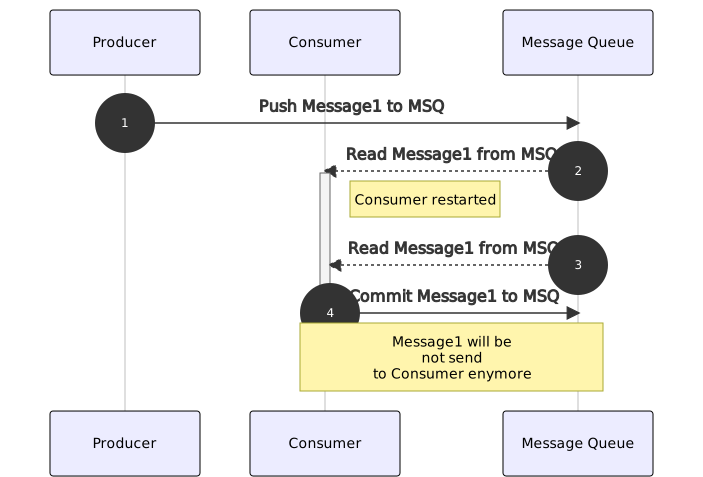
Kafka message queue key features
First of all, let’s overview the main features you will deal with when choosing Kafka as a message queue.
We need to understand the main concepts we will work with this information. We will not only deal with event publishing and consumption. There are more things we will deal with.
Key names
- Topic - something like database or collection in other databases. In a topic Kafka stores all events pushed to it. Consumers use a topic as well to read messages from it.
- Broker - Kafka node processes events.
- Partition - Kafka has a feature to scale between nodes and consumers. For this reason, the Kafka team introduced a partition rate (it’s just int number). This number is used in the scope of message distribution between partitions. Partitions assign to consumers and brokers uniquely.
- Producer - an application that pushes new events to a topic.
- Consumer - an application that reads messages from a topic, processes them and commits them.
Message stream
Message queue in Kafka builds over Kafka message stream. Actually, the message stream is just storage with all messages sequentially persisted. Data from the storage can be read by batches with a specific size in bytes.
Kafka can be used as a storage to read the data and build some decisions on top of it. This solution is usually used in Data Science. If we need to speed up calculation over the data, we can use Kafka Streams2.
When we want to use Kafka as a message queue. We read a batch of messages[^read_batch_message] with some shifts, parse them and start to process.
Partitions
This article should not focus on the partitions feature in Kafka. Still, unfortunately, it’s impossible to skip the topic in a consumer/producer context.
Warn: All messages with the same key (for example, user_uuid) will be sent to the same partition.
BE CAREFUL!
When we create a topic, we can specify the number of partitions (for example, 3). Then, based on the message key (usually generated UUIDv4), the Kafka client will choose one of the partitions and send a message to this partition.

The diagram above shows how Kafka clients sort messages between partitions. Partitions from topics used for Kafka distribution (add new nodes to a cluster) and consumer distribution as well see consumer paragraph.
Producer
The producer works most simply. We just produce message3 (send it to Kafka). Nothing special we want to discuss.
Consumer
As we agreed before, we will not review the partition part. In this stage, we will work only with group readers.
Kafka provides consumer groups feature. Group ID should be provided4 by a consumer that reads from a topic.
Partitions used to distribute messages between consumers. The group ID is used by Kafka to identify messages that need to be delivered to a specific consumer. It automatically distributes partitions between consumers from the same group (Group ID).
Two consumers from the same group will not receive the same message. Instead, every consumer will follow their specific partition(s) and receive a message from them.
If we use
user_uuidas a message key, then all messages from the same user will always be sent to the same partition and processed by the same consumer
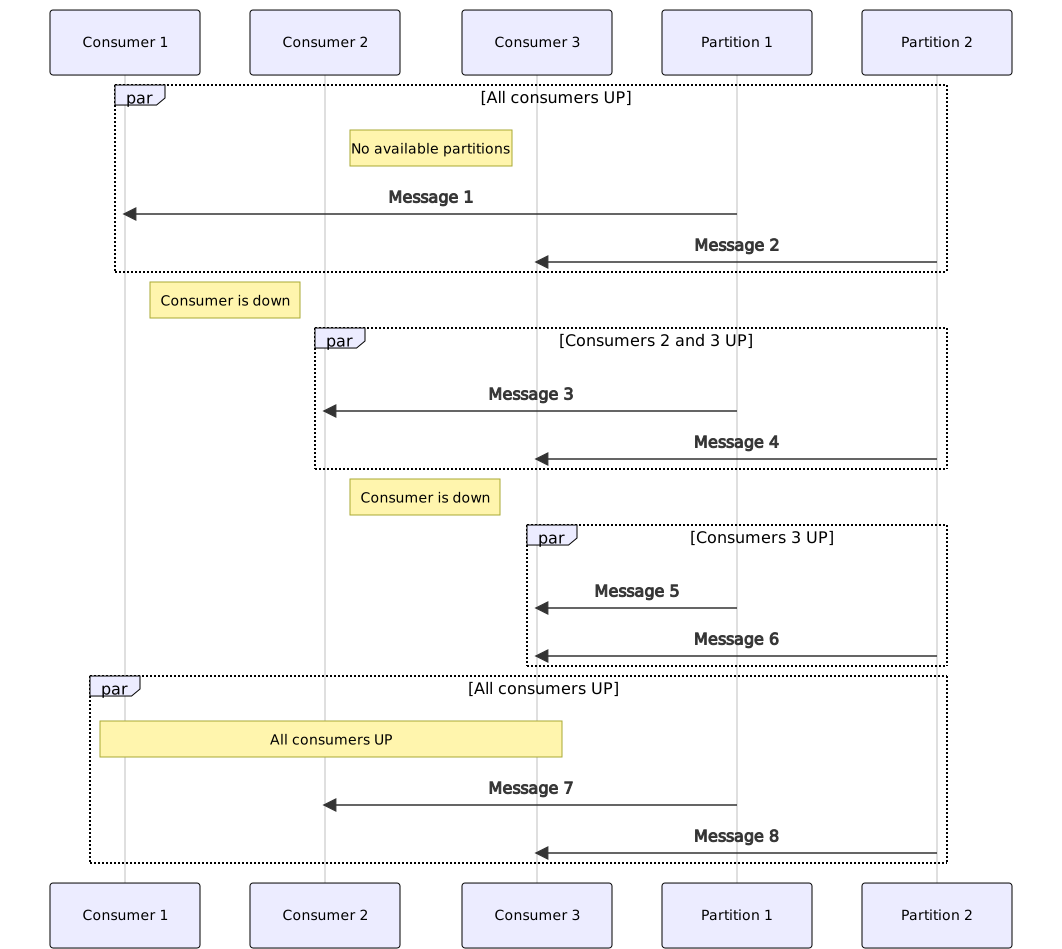
As we can see on the diagram, consumers automatically assign between partitions while running.
Warn: If we have more consumers than partitions, some will idle.
Commit message
When choosing a message queue pattern, we expect to work with messages individually. We hope to commit messages individually.
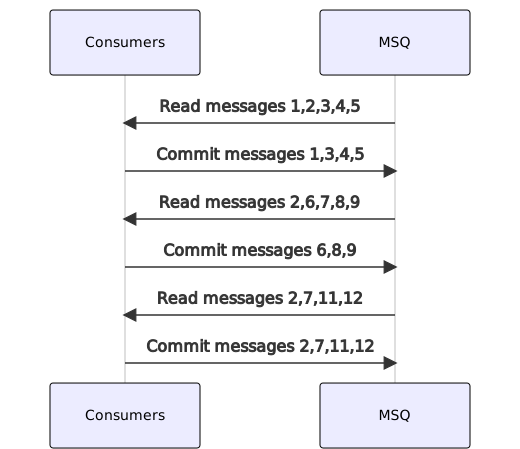
In the diagram above, we can see the example of our expectations. Of course, if we do not commit some individual message, we will receive it soon. Still it will not stop processing the following messages.
As we discussed, Kafka does not provide an API to work with messages individually, so we will shift our pointer of reading messages. If we skip one message and do not want to commit it, we cannot move forward, and we need to wait until this message is processed or ignored to shift our pointer and move forward to the next batch.
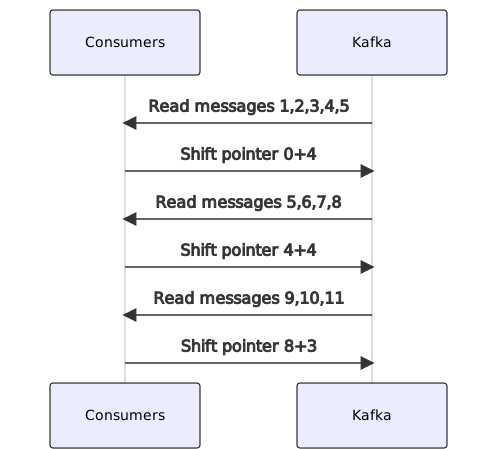
Following the diagram, we can see that we have to process all messages in any way if we want to move forward.
Warn: Kafka will not solve our individual message processing task. We have to think about a use case when a message cannot be processed.
Conclusion
Kafka is a powerful tool for message processing, but it has some limitations as with any other tool. It can solve a task with billions of messages, and it’s a fast solution. Moreover, it’s a solution with fault-tolerance out of the box. Unfortunately, however, we have to pay for these great features by increased complexity.
When we choose Kafka for the message queue task, instead of, for example, RabbitMQ, let’s remember about limitations and architecture decisions to cover edge cases in our code itself to make our product the best.
The main point I would like to highlight one more time:
- Remember about limitations with partitions
- Do not forget that you cannot commit individual messages
- Do not forget to commit all messages to avoid sticking in a queue
I hope this article will help someone avoid the main mistakes while working with Kafka.
Footnotes
-
The main concepts of Kafka. I did not find a direct link to Kafka documentation that explains only the partitions part. ↩
-
Kafka Streams is a solution to run code on the data side to speed up processing. I’d tell it to seem to be stored procedures from SQL. ↩
-
It requires a message key to specify a partition. Usually, the client will provide some UUIDv4 by default, ignoring it. ↩
-
A consumer can avoid group id, if it will subscribe to specific partition. But it’s not our case. ↩