Table of contents
Open Table of contents
Rise of phishing through “official” emails
There used to be nice times when we received emails from randomemail@gmail.com with an impersonation to some service or person.
It was simple to filter out those emails, but just looking at the sender’s email address.
Not anymore. Recent years there was a switch to utilizing ways to send emails with custom text from an official service.
The most popular example of emails:
- Referral links
- Invitation to a community/group
Since all of those emails put some sender’s information (sometimes with a custom text), that utilized to be used for phishing emails.
Case study: DigitalOcean referral links
Recently, I received an email from DigitalOcean containing a referral invitation. It looked like this:
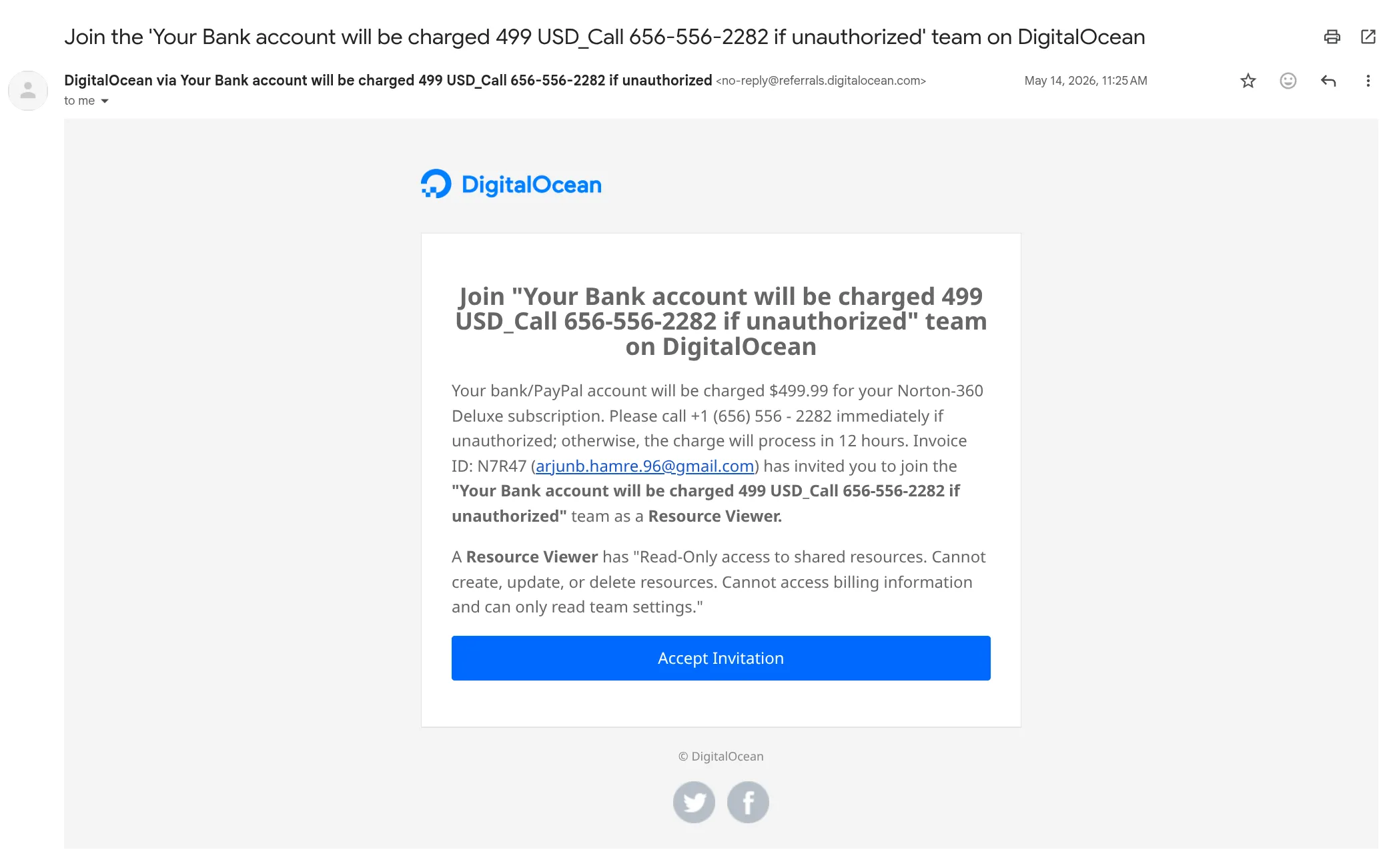
Key parts of the email were:
- Subject: Join the ‘Your Bank account will be charged 499 USD_Call 656-556-2282 if unauthorized’ team on DigitalOcean
- Sender’s name: DigitalOcean via Your Bank account will be charged 499 USD_Call 656-556-2282 if unauthorized
- Email address:
no-reply@referrals.digitalocean.com - Custom text from body: Your bank/PayPal account will be charged $499.99 for your Norton-360 Deluxe subscription. Please call +1 (656) 556 - 2282 immediately if unauthorized; otherwise, the charge will process in 12 hours. Invoice ID: N7R47 (arjunb.hamre.96@gmail.com)
Even though the email does not look consistent, by inviting to join a team, and only CTA is to Accept Invitation, text about a significant charge and direct communication methods may confuse users and make them to call/write to the scammers.
Reminder
While we used to rely on “technical” indicators of phishing emails, such as the sender’s email address, it is now equally important to inspect the content and intent of the message.
Many companies provide anti-phishing training and checklists. Use them regularly, and pause before acting on any urgent or emotional request.
What can happen if you engage
Let’s assume someone falls into the trap. What could happen next?
At least three scenarios are likely.
Clicking “Accept Invitation” link
The link may lead to accepting an empty project. This DigitalOcean org/project does not provide benefits, but it confirms the email is active and that you engage with messages. This may lead to more phishing emails in the future.
It may also expose additional account context that helps attackers research you using OSINT techniques, making future phishing attempts more personalized.
Also, they have a bond with you, since you are registered in DigitalOcean and the future emails will be more personalized, which may increase the chances of falling for the scam. More targeted attacks.
Replying to the email
Replying to the email will lead to a slow communication with scammers. They won’t try to scam in the first message, but they will try to build trust, scare you, and make you to make required actions.
Email is dangerous not only because scammers can request to pay something or steal data, but also because it can become a channel for technical attacks (malicious attachments, credential-harvesting links, and similar payloads).
Calling the phone number
Calling is often the most dangerous step, because scammers can pressure you in real time. During the call, it’s very hard to take a break and process the information.
They want immediate action without giving you time to think or verify. Typical scare tactics include fake charges, account lockouts, or threats about stolen personal information.
Reporting this to DigitalOcean
I tried to report this email to DigitalOcean, but they made it harder than it should be.
It’s not as simple as forwarding the email to abuse@digitalocean.com, but you need to fill out a form with various information about the email.
The form currently has no way to attach the original email, PDF, or screenshot.